

SA201 12V DC 2 Wire
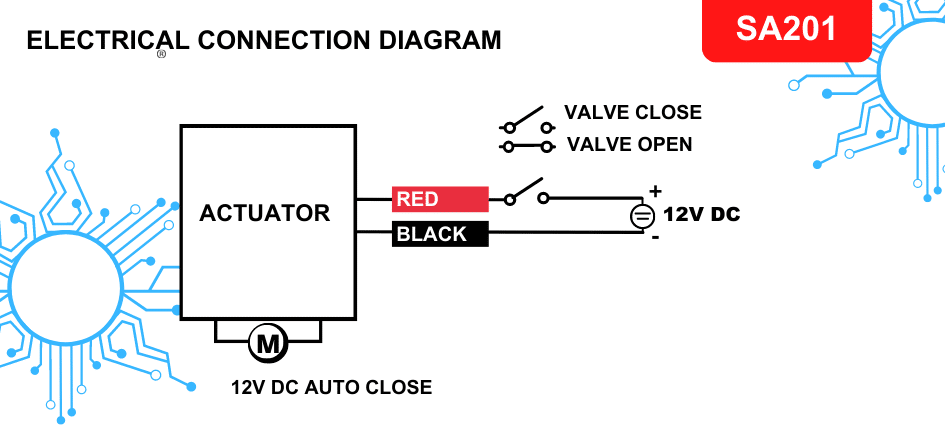
SA201 is a two-wire, 12V DC connection similar to solenoid valve wiring. Motorized valves using this auto-close circuit open when powered and close automatically when power is removed.
Wiring Diagram
Wire Connections
Disconnect power before making or changing any connections.
- Connect the black wire to the negative/GND terminal of the 12V DC supply.
- Connect the red wire to the positive terminal of the 12V DC supply through a switch.
- A float switch, relay contact or another switching device can replace the switch.
- For a level float switch, connect its common terminal to the positive power-supply terminal. Connect either its NO (normally open) or NC (normally closed) terminal to the valve's red wire, according to the required switching action.
How to Connect a Switch
A switch turns an electrical circuit on or off.
- Turn off the power. Isolate the circuit before working on any electrical device, using the circuit breaker or fuse controlling the circuit.
- Identify the switch terminals. Depending on the switch, these may be labelled common, normally open or normally closed. Check the configuration of the switch being used.
- Connect the circuit wires to the appropriate terminals. Use the terminal screws or connectors provided on the switch.
- Restore power after completing the connections.
- Test the switch. Toggle it on and off to confirm that it turns the circuit on and off as intended.
Safety: Working with electricity can be dangerous. Follow the relevant safety guidelines and consult a qualified electrician if you are unsure about connecting the switch or any other electrical device.