

How to use Manual Override for Motorized Valve V2
Use the V2 manual override to operate a motorized valve when automatic operation is unavailable, such as during a power failure. Most actuators are stay-put types and cannot close automatically when power is lost.

For Manual Override Mode
- If automatic operation fails, remove the power supply to the valve before using the manual override.
- Remove the manual override disengaging screw, as shown in Figure 2.
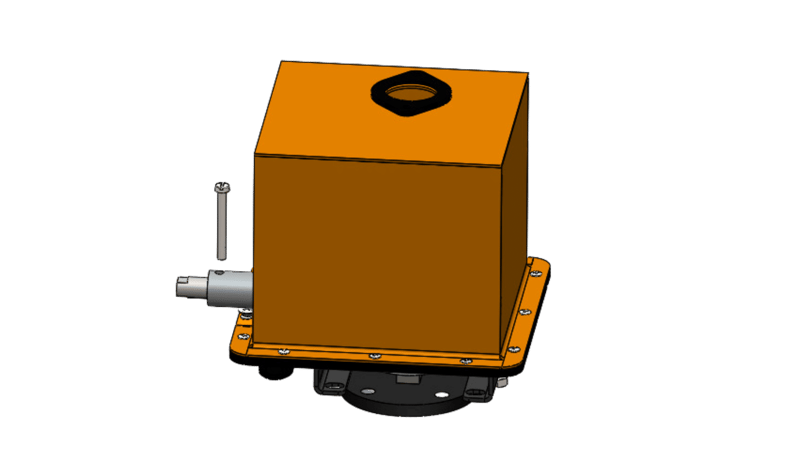
- Use the special manual override lever included in the package.
- Latch the lever onto the manual override shaft, as shown in Figure 3. Rotate it in the direction indicated on the cover.
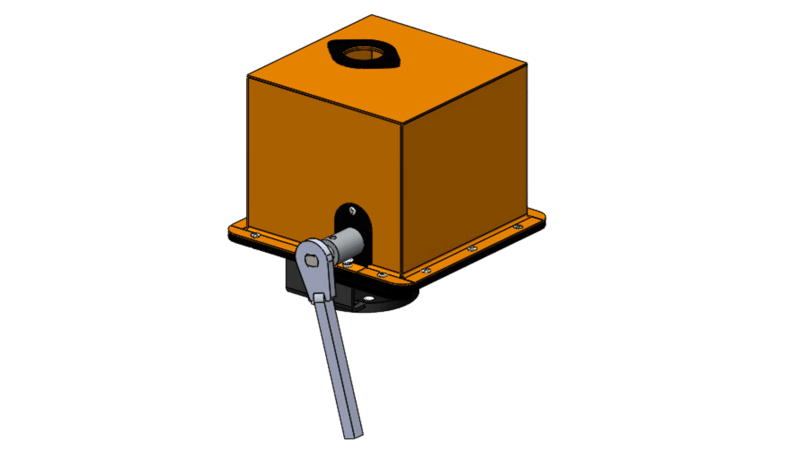
- Refer to the position indicator on top of the valve to check its opening or closing position.
- Rotate the shaft gently and stop when the valve is fully open or fully closed.
Important: Further rotation after reaching the fully open or fully closed position will damage the stoppers or gears.
For Automatic Mode
- Put the manual override disengaging screw back onto the shaft.
- If the screw cannot be fastened, rotate the lever slightly to align the shaft, then fasten the screw.
- Reconnect the power supply to restore automatic operation.
Video Demonstration
Download the Operating Guide
Download Manual Override for Motorized Valve V2 (PDF, English, 0.22 MB)
Updated April 13, 2025.